Free & Open Source

HoldorHolds
the door.

Lock your screen. Walk away. Holdor prevents macOS from sleeping while your AI agents are running. Claude, Cursor, Windsurf, VS Code, terminals — all protected.

Holdor – Stop your Agents from sleeping - Your Mac stays awake. Sleep is for humans, not agents. | Product Hunt
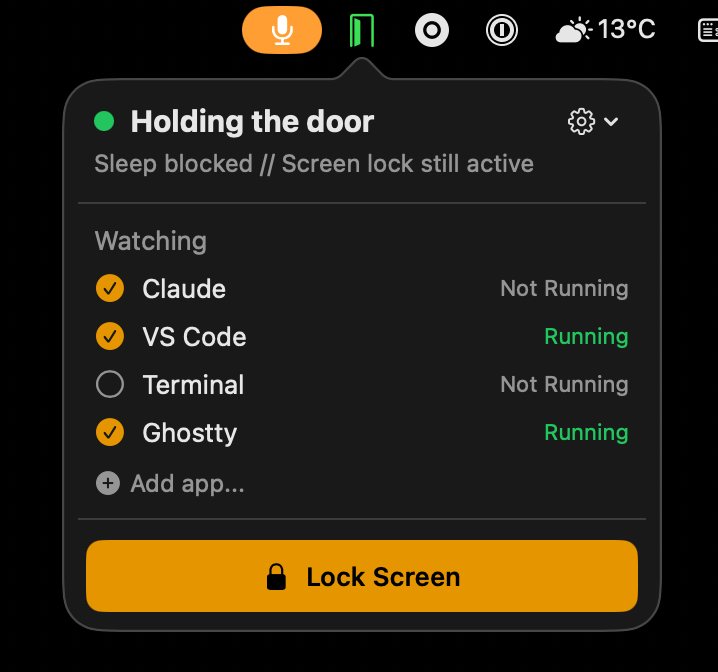
Holdor app showing active sleep protection with Claude running

The Problem #

Security Policy

Your company requires locking the screen when you step away. Non-negotiable.

macOS Sleeps

Lock triggers idle sleep. Your long-running AI agents get killed mid-task.

The Workaround

Carry your laptop everywhere? That's not a solution. That's a problem.

See the Difference #

Without Holdor 😱
With Holdor 🤩

The Solution #

  1. Launch Holdor

    Door icon appears in the menu bar. No dock icon, no windows, no clutter.

  2. Select Your Apps

    Toggle which apps to protect. Holdor auto-detects running processes.

  3. Lock & Walk Away

    Your agents keep working. Holdor holds the door.

What Holdor Protects Against #

Regular Mode

Default. Prevents idle sleep so your Mac stays awake when you walk away.

  • Screen lock
  • Display sleep
  • Idle sleep prevention
  • System sleep (lid close)
  • Manual sleep (Apple menu)
Extended Mode

Also prevents system sleep on lid close. Great for plugged-in setups.

  • Screen lock
  • Display sleep
  • Idle sleep prevention
  • System sleep (lid close)
  • Manual sleep (Apple menu)

Manual sleep (Apple menu > Sleep) cannot be overridden by any app. This is a macOS security boundary.

Features #

Menu Bar Native

Lives in the menu bar. No dock icon, no main window. Zero intrusion.

Auto-Detection

Detects when supported apps launch or quit. No manual PID hunting.

Smart Caffeinate

Uses macOS caffeinate tied to each process. Display sleeps, CPU stays awake.

Persistent Config

App selections persist across restarts. Set it once, forget about it.

10+ Apps Built In

Claude, Cursor, Windsurf, VS Code, Zed, ChatGPT, Warp, Terminal, iTerm, Ghostty.

Lightweight

Native Swift. No Electron. No runtime. Minimal memory and CPU footprint.

FAQ #

How does Holdor prevent macOS from sleeping?
Holdor uses macOS's built-in caffeinate command, tied to each app's process ID. In Regular mode it uses caffeinate -i -w PID to prevent idle sleep. In Extended mode it adds the -s flag to also prevent system sleep (e.g. lid close). When the watched app quits, the assertion is automatically released.
What's the difference between Regular and Extended mode?
Regular mode prevents idle sleep — your Mac won't go to sleep from inactivity. Extended mode additionally prevents system sleep triggered by closing the lid. Extended mode is ideal for plugged-in desktop setups. Both modes allow the display to turn off and the screen to lock normally.
Does Holdor drain my battery?
Holdor itself uses negligible resources — it's a native Swift app with no Electron runtime. In Regular mode, it only prevents idle sleep while watched apps are running. In Extended mode, your Mac stays awake even with the lid closed, which will use more battery if unplugged.
Which AI coding tools does Holdor support?
Holdor has built-in support for Claude Desktop, Cursor, Windsurf, VS Code, Zed, ChatGPT, Warp, Terminal, iTerm, and Ghostty. You can also add any macOS app via the native Finder file picker. Terminal apps cover CLI tools like Claude Code and OpenCode.
Can I lock my screen while Holdor is active?
Yes — that's exactly the point. Holdor prevents sleep but allows the display to sleep and the screen to lock. Your security policy is satisfied while your AI agents keep running in the background.
Is Holdor free?
Yes — Holdor is completely free and open source under the MIT license. The source code is available on GitHub. If it saves you from carrying your laptop around, you can optionally buy the developer a pasta.
Get Holdor #

Free, open source, built with Swift.

Requires macOS 13+ — Signed and notarized by Apple

Made in Vienna, Europe #

Johannes Nagl
Johannes Nagl
Concept, growth, and everything except coding Coding by Claude Opus
Connect on LinkedIn